Are you losing potential clients because your contact page is buried in your navigation menu? Or perhaps you are tired of heavy, expensive live chat plugins that slow down your website's loading speed and ruin your Core Web Vitals? Meet the Floating Contact Card Widget—a sleek, lightweight, and highly convertible sticky contact button designed to keep your business just one click away from your website visitors.
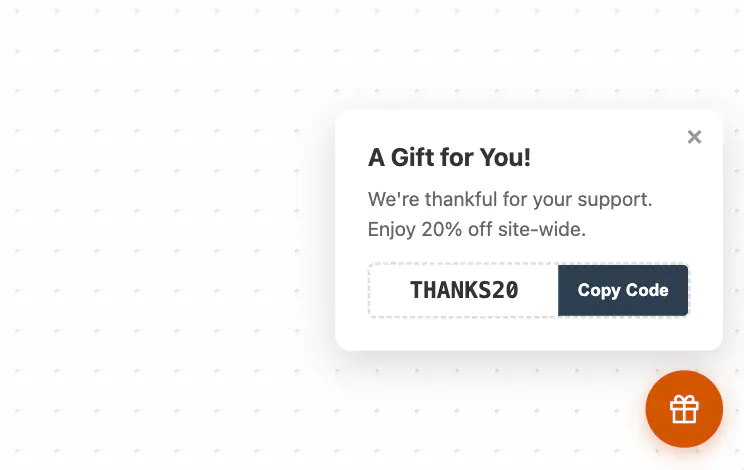
At first glance, this widget appears as a beautifully modern, circular chat bubble floating effortlessly over your website content. It features a subtle drop shadow and a gentle hover animation that invites interaction without distracting from your core web design.
When a user clicks the floating button, it doesn't open a clunky third-party chat interface. Instead, it smoothly expands into a beautifully styled, branded contact panel. This compact card greets the user with a customizable headline, a welcoming rich-text message, and a bold Call-to-Action (CTA) button (such as "Email Us", "Get a Quote", or "Call Now") that links directly to your preferred communication channel. Once they are done, a simple click of the elegant × close button seamlessly collapses the card back into its minimal bubble state.
Because every website layout is unique, this floating contact popup is engineered with an advanced spatial positioning system. Using the intuitive customizer, you can anchor the chat bubble to four specific, highly optimized screen locations:
Bottom-Right & Bottom-Left: The classic, familiar locations for website support widgets. The card elegantly scales and slides upward into view.
Center-Right & Center-Left: A modern layout alternative that anchors the bubble to the middle of the vertical Y-axis. Perfect for sites with sticky footers or bottom-heavy mobile designs. The panel smartly slides outward from the edge of the screen, creating a stunning native-app feel.
Zero Impact on Page Speed: Unlike traditional live chat software (which loads megabytes of external JavaScript and ruins your Google PageSpeed Insights score), this widget is built with pure, vanilla HTML, CSS, and JavaScript. It loads instantly and guarantees your SEO rankings remain untouched by bloated code.
100% Customizable No-Code Design: Every element of the floating contact card is fully editable. Change the bubble color to match your branding, write a custom rich-text welcome message, and set the CTA button to trigger a mailto: email link, a tel: phone number, or a link to your booking calendar.
Mobile-Perfect Responsiveness: Engineered to look flawless on smartphones, tablets, and desktop monitors. It gracefully hovers over your content without breaking your mobile layout or interfering with responsive grid systems.
Builder Safe Mode Integration: Whether you are using Squarespace 7.1, Elementor for WordPress, Webflow, or Shopify, this widget is completely safe to export and install. Our proprietary Builder Safe Mode ensures the sticky chat bubble won't freeze your drag-and-drop editors or block your workspace while you design.
Service-Based Businesses: Perfect for agencies, consultants, and contractors who want a persistent "Get a Quote" or "Book a Consultation" button floating on every page.
E-Commerce Stores: Use the welcome message to offer shipping help or direct shoppers to your customer support email, building instant trust and reducing cart abandonment.
Portfolios & Resumes: Let recruiters or potential clients reach out instantly with a floating "Hire Me" card that links directly to your inbox.
Upgrade your website's user experience today. The Floating Contact Card Widget is the fastest, cleanest, and most stylish way to drive customer interactions, capture leads, and provide top-tier support without sacrificing your website's performance.
Bring this layout to life on your website in just a few clicks.

Edit Floating Contact Card visually using the native Squarespace extension
First, ensure you have connected your website to the native Redesignee extension. Once connected, you have two easy ways to build:
Native Block: Simply add the native Redesignee Widget Block directly from the fluid engine editor menu inside Squarespace.
Manual Markdown: Add a standard Code Block, paste your widget’s code snippet, and the Redesignee floating "Customize" button will automatically appear right over the block.
Both methods let you tweak settings, copy items, and design visually in real time. Saving your changes syncs the updates instantly to your live page.
See Squarespace installation guide
Connect natively via Gutenberg or Elementor
Make sure you have the free Redesignee WordPress Plugin installed. To drop the Floating Contact Card into Elementor, simply drag and drop the Redesignee widget from your sidebar. If you are using the Gutenberg Block Editor, click the " + " icon and select the Redesignee Block. Launch the Cloud Library directly inside your workspace, choose your customized template, and import it with a single click. It automatically inherits your theme fonts and styles!
WordPress plugin installation guide
Quick copy-and-paste for custom setups
If you are using Webflow, Shopify, Wix, or a custom HTML site, click the "Export Widget" button on this page and ensure the platform selector is set to "HTML". Click "Copy" to copy the clean, un-nested source code snippet directly to your clipboard. Paste this code into any HTML component, Code Block, or Embed tool inside your website builder. All styles, animations, and scripts are self-contained and ready to run.
This Floating Contact Card widget is optimized and categorized inside the following layout packs:
Convert your product traffic effortlessly. Tweak tech-focused feature sections and pricing tables in our cloud library, grab the optimized code, and paste them directly into your layout.
Elevate your business site layouts instantly. Browse free and premium corporate modules from our cloud library, adjust elements visually, and copy-paste clean layouts straight to your page engine canvas.
Embrace pristine minimal structures. Tweak crisp whitespace templates visually inside our cloud canvas layout, copy the fast-rendering script output, and paste it straight onto your host site.