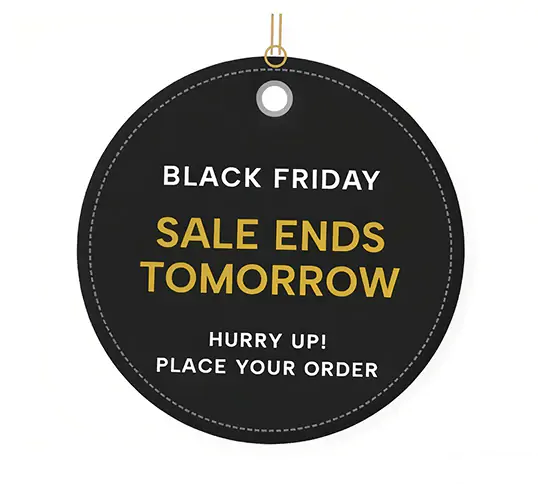
A realistic, standalone price tag widget featuring a punched hole, metallic eyelet, and sleek drop shadow, perfect for highlighting a specific discount code.
In the world of online shopping, bridging the gap between the digital and physical retail experience can instantly elevate your brand's aesthetic. The Price Tag Promo Label does exactly that. By perfectly recreating the look and feel of a premium, physical clothing tag, this widget provides a charming, highly tactile way to present discount codes, clearance amounts, or special holiday offers to your customers.
This widget relies on subtle skeuomorphic design—creating digital elements that mimic real-world objects—to stand out from standard web boxes.
The Physical Shape: Using advanced CSS, the top corners of the label are meticulously clipped at an angle, perfectly replicating a classic die-cut retail tag.
Punched Hole & Metallic Eyelet: Right at the top center, a transparent hole is "punched" straight through the tag. Surrounding it is a beautifully rendered, 3D-effect metallic eyelet created using layered CSS borders and inset shadows.
Realistic Drop Shadow: Because the shape of the tag isn't a standard rectangle, a traditional box shadow wouldn't work. Instead, the widget uses a CSS drop-shadow filter that strictly outlines the angled corners and the punched hole, lifting the tag off the page and giving it genuine physical depth.
Retail Typography: The main discount text uses a vertical scale transform (scaleY(1.15)) to condense and stretch the numbers, mimicking the tall, stamped typography found on high-end boutique price tags.
Despite looking like a complex image asset, this entire widget is built with code, offering total flexibility.
Zero Images Required: There are no transparent PNGs or heavy SVG files to load. The clipped corners are handled by a native clip-path, and the punched hole uses a CSS mask-image. This means the widget is incredibly lightweight and resolves instantly.
True Transparency: The background of the widget is completely transparent. The hole at the top of the tag is genuinely see-through, meaning if you place this tag over a background pattern, gradient, or lifestyle photo, that background will show right through the punched hole!
Fully Editable: Every single piece of text, from the massive discount numbers to the fine print at the bottom, is directly editable in the customizer. The color of the tag and the eyelet ring can also be adjusted via CSS variables.
This is the ultimate widget for highlighting a specific promo code. Drop it onto a dedicated landing page for your email subscribers, place it next to a featured product in a lookbook layout, or use it as a standalone graphic on your cart page to remind shoppers to use their "CHILLY" discount code before checkout.
Bring this layout to life on your website in just a few clicks.

Edit Price Tag Promo Label visually using the native Squarespace extension
First, ensure you have connected your website to the native Redesignee extension. Once connected, you have two easy ways to build:
Native Block: Simply add the native Redesignee Widget Block directly from the fluid engine editor menu inside Squarespace.
Manual Markdown: Add a standard Code Block, paste your widget’s code snippet, and the Redesignee floating "Customize" button will automatically appear right over the block.
Both methods let you tweak settings, copy items, and design visually in real time. Saving your changes syncs the updates instantly to your live page.
See Squarespace installation guide
Connect natively via Gutenberg or Elementor
Make sure you have the free Redesignee WordPress Plugin installed. To drop the Price Tag Promo Label into Elementor, simply drag and drop the Redesignee widget from your sidebar. If you are using the Gutenberg Block Editor, click the " + " icon and select the Redesignee Block. Launch the Cloud Library directly inside your workspace, choose your customized template, and import it with a single click. It automatically inherits your theme fonts and styles!
WordPress plugin installation guide
Quick copy-and-paste for custom setups
If you are using Webflow, Shopify, Wix, or a custom HTML site, click the "Export Widget" button on this page and ensure the platform selector is set to "HTML". Click "Copy" to copy the clean, un-nested source code snippet directly to your clipboard. Paste this code into any HTML component, Code Block, or Embed tool inside your website builder. All styles, animations, and scripts are self-contained and ready to run.
This Price Tag Promo Label widget is optimized and categorized inside the following layout packs:
Elevate your business site layouts instantly. Browse free and premium corporate modules from our cloud library, adjust elements visually, and copy-paste clean layouts straight to your page engine canvas.
Embrace pristine minimal structures. Tweak crisp whitespace templates visually inside our cloud canvas layout, copy the fast-rendering script output, and paste it straight onto your host site.
Make your layouts stand out instantly. Tweak advanced visual elements inside our cloud design workspace, copy the lightweight framework strings, and drop them seamlessly onto your canvas.
Boost your holiday revenue with engaging promo bars, countdown timers, and seasonal floating effects. Customize high-converting sales components and drop them straight into your live site.